
Download Image AI App – Free AI Image Generator for Windows, Mac, Android & iOS
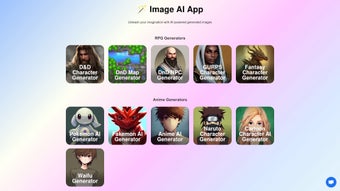
Unleash your creativity with Image AI App, a powerful, web-based AI tool that transforms your ideas into stunning visuals. Whether you're designing RPG characters, crafting fantasy maps, or generating anime-style artwork, this AI-powered image generation toolset makes it easy and fast. With advanced features like text-to-image conversion, image upscaling, restoration, and customizable background generation, Image AI App is perfect for game developers, digital artists, and hobbyists alike. No technical skills required—just type a prompt and watch the AI bring your vision to life. Available for Windows, Mac, Android, and iOS, this secure, free software ensures a seamless experience across all devices. Regular updates keep the AI models sharp and responsive, making it one of the best AI image tools on the market today.
Why Image AI App Stands Out in the World of AI Creativity
The rise of generative AI has revolutionized digital art, and Image AI App is at the forefront of this creative wave. Unlike many other AI tools that focus on a single function, Image AI App offers a comprehensive suite of features designed to support every stage of the creative process. From initial concept sketches to final polished visuals, this web-based software handles it all with remarkable precision and speed. What sets it apart is its versatility—whether you're a game designer crafting a new world or a hobbyist exploring anime aesthetics, the app adapts to your needs. One of the most impressive aspects of Image AI App is its ability to generate high-quality, context-aware images from simple text prompts. For example, typing “cyberpunk city at night with neon lights and flying cars” instantly produces a detailed, atmospheric image that captures the mood and style you envisioned. The AI doesn’t just generate random visuals—it understands artistic styles, lighting, composition, and even cultural references. This level of intelligence makes it ideal for professional-grade projects. Moreover, the app includes specialized generators for niche use cases, such as RPG character creation, NPC design, and fantasy map generation. These tools are particularly valuable for indie game developers who need consistent, stylized assets without hiring artists. The ability to generate multiple variations from a single prompt allows for rapid prototyping and experimentation. With no need for expensive software or complex training, users can start creating within minutes. The interface is intuitive, clean, and responsive, ensuring a smooth experience whether you're on a desktop or mobile device. And because it's cloud-based, your projects are always accessible and backed up.Key Features That Elevate Your Creative Workflow
Image AI App isn’t just another AI image generator—it’s a full-featured creative toolkit. Here’s what makes it a must-have for artists and designers:- Text-to-Image Generation: Turn any idea into a visual masterpiece with natural language prompts. Supports detailed descriptions, artistic styles, and mood settings.
- AI-Powered Image Upscaling: Enhance low-resolution images without losing detail. Perfect for restoring old photos or improving game assets.
- Image Restoration & Enhancement: Automatically fix blur, noise, and color distortion for a professional finish.
- Custom Background Generator: Create unique, seamless backgrounds tailored to your project’s theme—ideal for game environments or digital illustrations.
- RPG & Fantasy Character Creator: Generate diverse characters with customizable traits, outfits, and species (humans, elves, robots, etc.).
- Interactive Coloring Pages: Download printable pages and color them digitally or on paper—great for kids and educators.
- Multiple Art Styles: Choose from anime, cartoon, realistic, cyberpunk, sci-fi, and more with one-click style selection.
- Batch Generation: Produce multiple variations of a single prompt to explore different creative directions.
Easy Installation, Cross-Platform Compatibility, and Seamless Usage
One of the biggest advantages of Image AI App is its no-installation, web-based nature. There’s no need to download bulky software or worry about system requirements. Simply visit the official website, sign up for a free account, and start creating immediately. This makes it accessible to users on any device—whether you’re using a Windows PC, Mac, Android tablet, or iOS smartphone. For those who prefer a dedicated experience, a lightweight desktop app is available for Windows and Mac, offering offline access and faster performance. The app syncs your projects across devices via cloud storage, so your work is always up to date. Installation is straightforward: download the installer, follow the on-screen instructions, and log in with your account. No technical expertise is required. Once set up, using Image AI App is intuitive. The dashboard presents all tools in a clean, organized layout. Just select a generator (e.g., “Fantasy Character”), enter your prompt, choose a style, and click “Generate.” Within seconds, your image appears. You can then tweak it using the built-in editor—adjust brightness, crop, apply filters, or upscale the image. The app also supports drag-and-drop uploads for restoration and enhancement tasks. Regular updates ensure the AI remains accurate and efficient. The developers actively listen to user feedback, introducing new styles, fixing bugs, and improving response times. Security is a top priority—your data is encrypted in transit and at rest, and the platform complies with GDPR and other privacy standards. Whether you’re a beginner or a seasoned artist, Image AI App delivers a reliable, secure, and enjoyable experience.Pros and Cons: Is Image AI App Right for You?
- Pros:
- Free to use with generous daily credits
- High-quality, diverse image generation across multiple styles
- Intuitive, user-friendly interface
- Supports cross-platform access (Windows, Mac, Android, iOS)
- Advanced tools like upscaling, restoration, and background generation
- Regular updates and responsive developer support
- Secure, cloud-based storage with encryption
- Cons:
- Free tier has limited daily generation quota
- Some advanced features require a premium subscription
- Web-based version may be slower on low-bandwidth connections
- AI occasionally misinterprets complex prompts
- Limited customization for advanced users in free version
Frequently Asked Questions (FAQ)
Is Image AI App free to download and use?
Yes, Image AI App is completely free to download and use. The free version includes a daily credit system that allows you to generate a set number of images each day. Additional credits can be earned through daily login or upgraded via a premium subscription.
Can I use Image AI App on my mobile device?
Absolutely. Image AI App is fully compatible with Android and iOS devices. You can access the web version through your browser or download the lightweight app for a smoother experience.
Does Image AI App support text-to-image generation?
Yes, one of the core features is text-to-image generation. Simply type a detailed description, select a style, and let the AI create your image in seconds.
How does the image upscaling feature work?
The AI upscaling tool enhances low-resolution images by predicting missing details and improving clarity. It’s ideal for restoring old photos or improving game assets without pixelation.
Is my data secure when using Image AI App?
Yes, Image AI App uses end-to-end encryption for all user data. Your images and prompts are not stored permanently and are deleted after a set period unless you choose to save them in your private library.



.png)



